best practices organising research notes Obsidian graph view connections
The Power of Obsidian’s Local Graph - The Sweet Setup
Source: https://thesweetsetup.com/the-power-of-obsidians-local-graph/
Title: The Power of Obsidian’s Local Graph – The Sweet Setup
URL Source: https://thesweetsetup.com/the-power-of-obsidians-local-graph/
Published Time: 2021-05-20T15:00:19+00:00
Markdown Content: The promise of apps like Obsidian and Roam Research is to give you a tool for connected note-taking. With this approach, you can see the commonalities between your thoughts as your notes bump up against one another, allowing you to see connections and discover new insights. These connections are usually represented in some sort of Graph View, which can look like a complex spiderweb of notes and ideas.
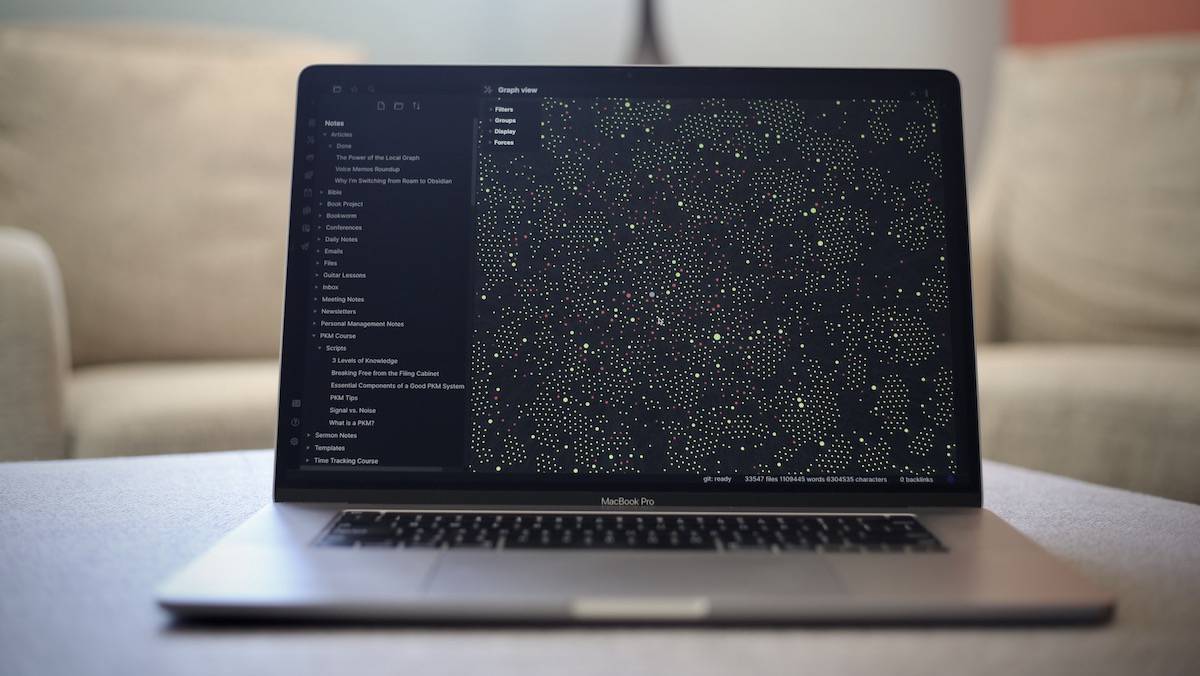
It looks impressive, but in reality, it’s often kind of useless.
In this article, I’ll show you how to leverage the Local Graph in Obsidian to navigate your notes. And if you prefer to watch, here’s a video.
Note Linking & The Graph View
At the heart of the Graph View is the concept of note linking. By making connections between notes, you are saying that these two ideas or notes have something in common and belong together. The more ideas you link together, the more they impact one another and shape the eventual output — whether that be a blog post, podcast, video, or simply your developed thoughts on a topic.
Truth be told, your brain is doing this exact thing all the time. It’s really good at connecting the dots you collect and making new things out of them, but it may not feel natural at first.
I first stumbled on this idea in Steal Like an Artist by Austin Kleon. Before reading this book, I couldn’t describe myself as “creative.” I used to get frustrated because every time I tried to create, I’d eventually notice that my work ended up being heavily influenced by something I had read, seen, or heard somewhere else. I assumed that I just didn’t have the ability, the creative gene, to make anything inspired like so many of my internet heroes did.
But Austin Kleon helped me to realize that creativity is not coming up with something completely original. It’s simply remixing the things that you take in. In fact, nothing is completely original. When you create something, you are simply connecting the dots in ways that haven’t been connected before.
I decided that I wasn’t going to worry about judging the output anymore. I was simply going to do my best to collect new dots and let my brain connect them however it was inclined to do so. Whatever came out was simply the logical result of the dots I had collected. I had a formula for my creativity. I was going to improve my creative output by simply collecting better inputs.
What I love about the Graph View is that it allows you to visualize these connections that already exist in your brain. It also allows you to manipulate the dots and connect them in new and i
Organizing Your Notes on Obsidian - Albert’s Blog
Source: https://blog.albertkuo.me/post/2023-12-28-organizing-your-notes-on-obsidian/
Title: Organizing Your Notes on Obsidian
URL Source: https://blog.albertkuo.me/post/2023-12-28-organizing-your-notes-on-obsidian/
Published Time: 2023-12-28T00:00:00+00:00
Markdown Content: I use a note-taking app at work called Obsidian, but only recently did I get around to learning how to use more of its functionality.
For the uninitiated, Obsidian is a note-taking app that uses markdown, which is a markup language that’s simple to learn and readable.1 The advantage of a markup language is that it makes your formatting explicit in what you write. If you’ve ever struggled with manually adjusting unexpected indentations, spacings, etc. on Microsoft Word through a maze of drop-down menus and pop-up windows, that’s the kind of situation where a markup language would be helpful. On the other hand, the downside of a markup language is that it makes your formatting more restrictive. For example, in Microsoft OneNote, you can create multiple cells of text anywhere on the page; this would be prohibitively difficult to do in markdown. There’s more to be said about why markdown is popular, but I’ll leave it here for the sake of brevity.
What I want to talk about in this post instead is how to organize your notes on Obsidian. This has become an increasingly pressing issue for me as I’ve accumulated more and more notes.
Using Backlinks to Organize Notes
First, let’s talk about backlinks and why they are an incredible way to organize your notes. In Obsidian, there are actually three different ways you can organize your notes:2
- Folders - This is the organizational structure we are all familiar with. It imposes a top-down hierarchical structure. It is also the least flexible way to organize your notes because every note can only be located in one folder.
- Tags - This is also a structure many of us are already familiar with due to its popularity on social media platforms and other apps. Tags are more flexible than folders because you can link one note to multiple tags. So for example, if you have a meeting with Bob discussing Project A and Project B, you can tag the meeting note with the tags
#bob,#project-a,#project-b. Now you can find this note under any of those tags. You can also create nested tags like#meeting/bob. - Backlinks - This is the most flexible organizational structure. The way to think about backlinks (denoted as
[[link]]in markdown) is that every “tag” is now a note. This kind of note is called a map of content (MOC) note. For instance, instead of using tags, you can link your meeting note to[[Bob]],[[Project A]], `[[Projec
Struggling with Graph View and Note Linking - Help - Obsidian Forum
Source: https://forum.obsidian.md/t/struggling-with-graph-view-and-note-linking/84690
Title: Struggling with Graph View and Note Linking
URL Source: https://forum.obsidian.md/t/struggling-with-graph-view-and-note-linking/84690
Published Time: 2024-07-03T17:17:04+00:00
Markdown Content:
Struggling with Graph View and Note Linking - Help - Obsidian Forum

Sign Up Log In
-
-
Struggling with Graph View and Note Linking
You have selected 0 posts.
1 / 2
Jul 2024
post by emily on Jul 3, 2024

Hi everyone,
I’m fairly new to Obsidian and I’ve been enjoying it so far, especially the ability to keep my notes locally and the flexibility it offers with plugins and themes. However, I’m struggling a bit with getting the most out of the Graph View and internal note linking.
Here’s my main issue: I understand the basics of creating and linking notes, but my Graph View still looks quite messy and doesn’t seem to reflect the structure I’m aiming for. I have several related notes, but they don’t always show up as connected in the graph, even though I’ve linked them. Sometimes it feels like I’m missing something in the linking process or maybe there’s a better way to organize my notes to make the graph more useful.
Additionally, I sometimes find it challenging to keep track of which notes I have linked together, and I end up creating duplicate links or missing important connections.
Could someone please offer some advice or best practices on:
- How to effectively use internal links to improve the Graph View?
- Any tips on organizing notes to make the graph clearer and more informative?
- Are there specific plugins or settings that could help with managing links and visualizing connections better?
Mastering Obsidian’s Graph View for Knowledge Management
Source: https://medium.com/@lennart.dde/mastering-obsidians-graph-view-for-knowledge-management-f1bbe2c8f087
Title: Mastering Obsidian’s Graph View for Knowledge Management
URL Source: https://medium.com/@lennart.dde/mastering-obsidians-graph-view-for-knowledge-management-f1bbe2c8f087
Published Time: 2024-06-28T21:02:36Z
Markdown Content:
Mastering Obsidian’s Graph View for Knowledge Management | by Len | Medium
Sign up
Get app
Sign up

Member-only story
Mastering Obsidian’s Graph View for Knowledge Management

Follow
5 min read
·
Jun 28, 2024
55
1
How to organize your notes in Obsidian // The LATCH method
Source: https://www.youtube.com/watch?v=vS-b_RUtL1A
Title: How to organize your notes in Obsidian // The LATCH method
URL Source: https://www.youtube.com/watch?v=vS-b_RUtL1A
Markdown Content:
How to organize your notes in Obsidian // The LATCH method - YouTube
Back 
Skip navigation
Search
Search with your voice
How to organize your notes in Obsidian // The LATCH method
Tap to unmute
2x
How to organize your notes in Obsidian // The LATCH method
Nicole van der Hoeven 257,344 views 3 years ago
Search
Copy link
Info
Shopping
If playback doesn’t begin shortly, try restarting your device.
•
You’re signed out
Videos you watch may be added to the TV’s watch history and influence TV recommendations. To avoid this, cancel and sign in to YouTube on your computer.
Cancel Confirm
Share
An error occurred while retrieving sharing information. Please try again later.
0:00
0:00 / 0:00
Live
•Watch full video
•
Intro
•
14:44 Give Me 15 Minutes. I’ll Teach You 80% of Obsidian Linking Your Thinking with Nick Milo 740K views • 6 months ago Live Playlist ()Mix (50+)32:19 How the CEO of Obsidian Takes his Notes (Underrated Genius)Karlos Obsidian Tutorials 237K views • 3 months ago Live Playlist ()Mix (50+)[1:47 7 1 Vẽ bầu trời 2 No views •